One listing in. A week of content out.
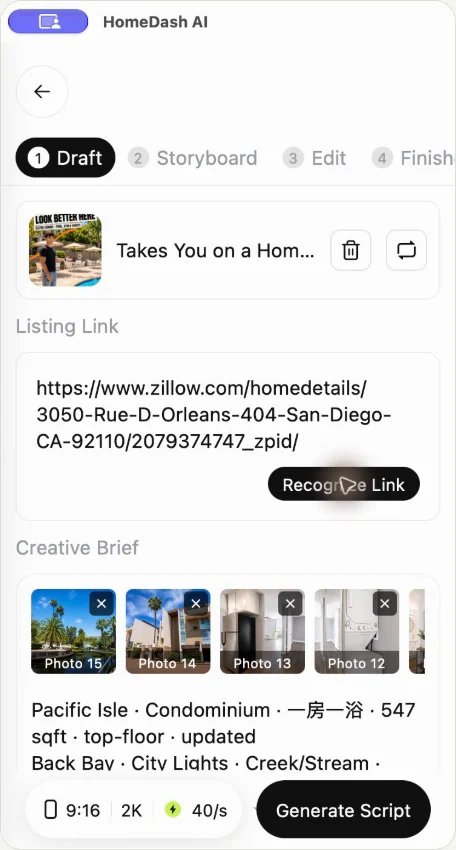
Paste a listing link or add photos you are authorised to use. HomeDash writes the script, builds the video and makes listing posters with your logo and contact details. Your agents review, edit and share.
AI MARKETING DEPARTMENT FOR PROPERTY AGENCIES
Paste a listing. HomeDash turns it into a short video and listing posters with your agency's logo and contact details, ready for your agents to publish to Facebook, Instagram and Threads, or share on WhatsApp.
iOS and Android · In-app purchases · Availability varies by region
THE SHIFT
Large networks have marketing teams producing content every day. Most agencies have agents and listings, but no one whose job is marketing.
One video can take an evening: time that should go to viewings and follow-ups.
Fine for one flagship listing. Too expensive when you have fifty.
The same photos as every other agency, and nothing new to share with your buyers.
WHAT HOMEDASH DOES
Paste a listing link or add photos you are authorised to use. HomeDash writes the script, builds the video and makes listing posters with your logo and contact details. Your agents review, edit and share.
Generic AI tools do not know an estate’s recent transactions or school net. In Hong Kong, HomeDash adds recent estate transactions, price per square foot and school-net information, so buyers see an agent who knows the area.
Publish or schedule to Facebook, Instagram and Threads from the app, or download the video and share it in your WhatsApp groups.
REAL LISTINGS. REAL OUTPUTS.
Compare our latest California videos and Gary’s Singapore pilot with their original listings. Explore more US examples below.
URL IN → VIDEO OUT
An AI-generated property marketing example. Compare the output with the source listing.
View the Zillow source listing ↗Watch / share on YouTube ↗URL IN → VIDEO OUT
An AI-generated property marketing example. Compare the output with the source listing.
View the Zillow source listing ↗Watch / share on YouTube ↗URL IN → VIDEO OUT
An AI-generated property marketing example. Compare the output with the source listing.
View the Zillow source listing ↗Watch / share on YouTube ↗URL IN → VIDEO OUT
An AI-generated property marketing example. Compare the output with the source listing.
View the Zillow source listing ↗Watch / share on YouTube ↗URL IN → VIDEO OUT
An AI-generated property marketing example. Compare the output with the source listing.
View the Zillow source listing ↗Watch / share on YouTube ↗URL IN → VIDEO OUT
One Shenton, presented with Gary’s AI likeness and voice using an established presenter setup.
View the One Shenton source listing ↗Watch / share on YouTube ↗URL IN → VIDEO OUT
An AI-generated property marketing example. Compare the output with the source listing.
View the Zillow source listing ↗Watch / share on YouTube ↗URL IN → VIDEO OUT
An AI-generated property marketing example. Compare the output with the source listing.
View the Zillow source listing ↗Watch / share on YouTube ↗URL IN → VIDEO OUT
An AI-generated property marketing example. Compare the output with the source listing.
View the Zillow source listing ↗Watch / share on YouTube ↗URL IN → VIDEO OUT
An AI-generated property marketing example. Compare the output with the source listing.
View the Zillow source listing ↗Watch / share on YouTube ↗AI-generated examples. Results depend on source materials and the selected workflow. Gary’s pilot used an existing presenter setup; new face and voice setup is a separate step.
HOMEDASH.AI
A simple workflow, with you in control of the final result.
Start with property photos and the details you are authorised to use.
Choose a suitable format, add your brand and review the script.
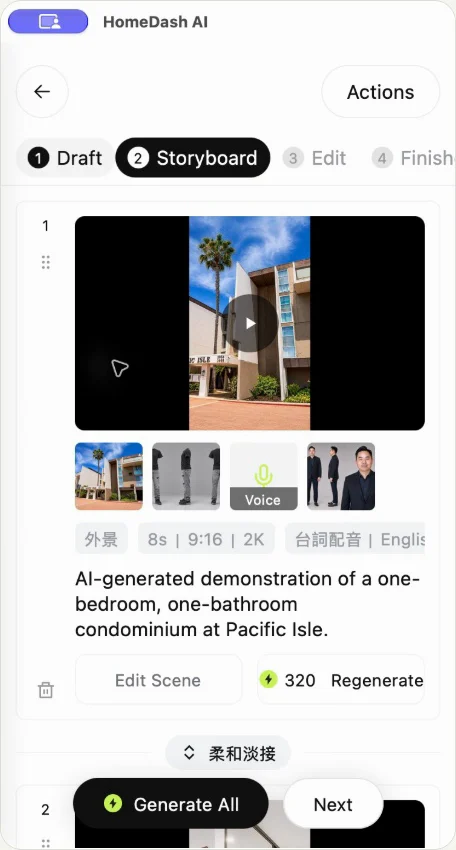
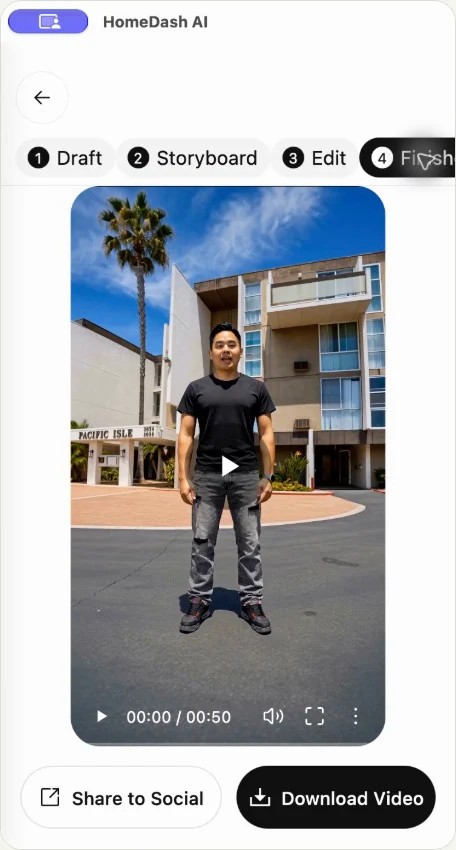
Check property facts, visuals and pronunciation before publishing.
APP WALKTHROUGH
Follow the real app screens, from a property listing link to a finished video. Learn how to reopen an existing project and save its video to Photos.
English narration and subtitles · 4:26
AI-generated example. Review the video and property details before sharing.
HOMEDASH.AI
Explore the September 2026 workflow design: video ideas, property input, scene review, editing and output. English or Traditional Chinese guidance with Chinese UI. Silent design walkthrough with illustrative media; the installed app may differ.
HOMEDASH.AI
Different teams need different things. Here is where HomeDash fits.
You may not need us, or use HomeDash for busy periods and new launches.
The HomeDash AI app, on your phone.
Download the appHomeDash for agencies. This is who we built it for. Start with a few of your listings and a small group of agents, then decide.
Book an agency pilotHOMEDASH.AI
Whether you market your own listings or support an entire network, start with the workflow that matters to you.
Give a selected group of agents a practical way to create property content. Start small, review the work and measure real adoption.
ExploreExplore how property video can fit into your existing client service. Keep your customer relationship and agree on delivery together.
ExploreExplore an additional video offering built around the property materials you already create for agents.
ExploreTest whether property video is a useful addition for your agent customers, through a focused distribution or service pilot.
ExploreAI can help tell a better story. You remain responsible for checking the listing, the visuals and the message before it reaches a customer.
No. It does the marketing work so your agents can spend more time with buyers and owners.
No. They paste a listing, review the draft and share it. Editing tools are there if they want them.
Yes. Add your logo and contact details as brand assets and they appear on what you create.
HomeDash AI is available on the Apple App Store and Google Play. Your store shows device compatibility and regional availability. Website languages do not imply that every app or video language is supported.
Discuss an agent-presenter or voice option during onboarding. Availability depends on the workflow, and use of a face or voice requires permission.
Generated visuals can differ from the source. Check layout, dimensions, views and claims before publishing, and clearly identify conceptual imagery.
Yes, we welcome team and partner pilot discussions. We agree on users, volume, support and a practical success measure before the pilot starts.
The app offers in-app purchases. Check the store and in-app screens for current prices, credits and renewal terms. Team production and custom workflows are quoted separately.
HOMEDASH.AI
Create in the app, or talk to us about production for your team and clients.

Create on iOS or Android. Your store confirms availability, device requirements and current in-app purchases.